
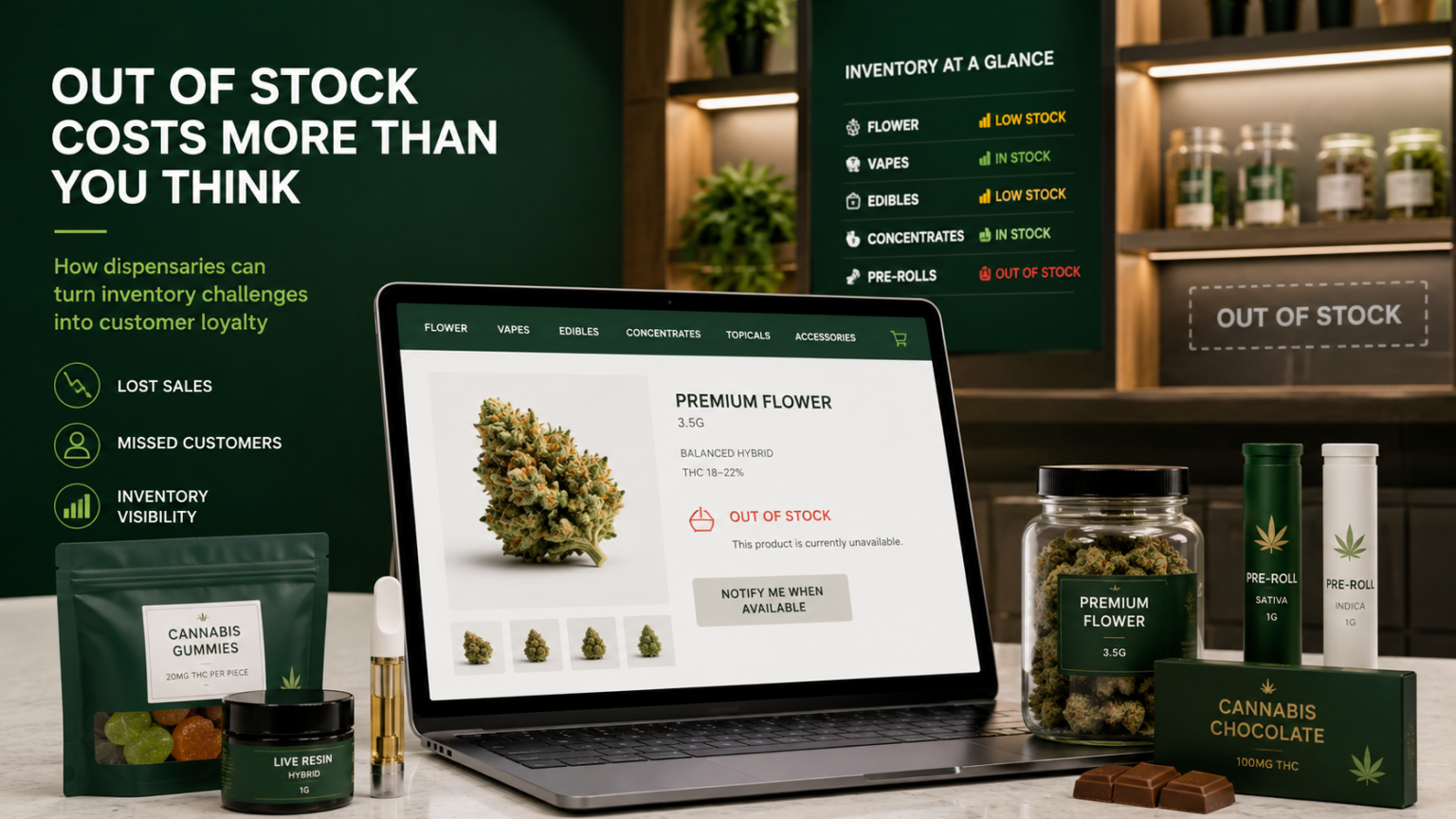
Cannabis dispensary inventory changes constantly. We get questions from dispos all the time wondering what are the best practices for when their ecommerce inventory goes out of stock. This guide discusses Out of Stock Best Practices:
Popular strains sell out. Limited drops disappear. Brands rotate products. Potency and terpene profiles change by batch. A product available today may be gone tomorrow and may never return in exactly the same form.
That creates an important SEO and ecommerce question:
What should happen to a cannabis product page when the product goes out of stock?
Handled incorrectly, out-of-stock inventory can create thousands of dead pages, frustrate customers, weaken organic visibility, and waste the SEO authority your website has already earned.
Handled correctly, those same pages can continue attracting qualified traffic, directing customers to available products, and supporting long-term search growth.
Dispensaries Here are Your Main ‘Out of Stock’ Options
When a cannabis product goes out of stock, a dispensary can:
- Keep the product page live and show “Out of Stock”
- Keep the page live and recommend available alternatives
- Keep the page live with a restock notification
- Remove the page and return a 404 or 410 response
- Temporarily redirect the page
- Permanently redirect the page
- Apply a
noindexdirective - Consolidate the product into an evergreen strain, brand, category, or product page
There is no single correct answer for every dispensary.
The right strategy depends on whether the product is expected to return, whether the page has earned rankings or backlinks, and whether a relevant replacement exists.
Why Cannabis Product Pages Require a Different Strategy
Traditional ecommerce stores may sell the same SKU for years. Cannabis dispensaries often carry products for only a few days or weeks.
Cannabis inventory can vary by:
- Brand
- Strain
- Cultivator
- Product type
- Package size
- THC percentage
- Cannabinoid profile
- Terpene profile
- Production batch
- Store location
- Medical or recreational availability
Without a clear out-of-stock strategy, a dispensary website can quickly accumulate outdated or low-value URLs.
This can lead to:
- Customers landing on products they cannot purchase
- Search engines crawling large numbers of expired pages
- Organic authority being spread across outdated inventory
- Inaccurate product availability in search results
- Broken links from social media, blogs, and brand websites
- Poor visibility for more important category and location pages
The answer is not to automatically delete every product as soon as it sells out.
The goal is to manage the full lifecycle of each product page.
Option 1: Keep the Product Page Live
Keeping the page live preserves its URL, rankings, backlinks, internal links, and search history.
This is often the right strategy when:
- The product is expected to return
- The page receives organic traffic
- Other websites link to the product
- The product is part of an ongoing brand or strain lineup
- The page contains useful educational content
- Similar products are currently available
However, a page that only says “Out of Stock” creates a dead end.
A customer searching for a specific flower, edible, vape, or concentrate should be given a clear next step.
The page should also display:
- Similar products
- Other products from the same brand
- Products from the same category
- Comparable strains
- Similar cannabinoid or terpene profiles
- Alternative sizes or formats
- Availability at another dispensary location
Instead of simply displaying:
Out of Stock
Use customer-focused language such as:
This product is not currently available at our Worcester dispensary. Explore similar products available today.
This preserves the SEO value of the page while giving the customer a path to purchase.
Option 2: Keep the Inventory Page Live and Recommend Alternatives
For many dispensaries, this is the strongest approach.
The original product page remains accessible, but the website dynamically recommends related products that are currently in stock.
For example, if a customer lands on an unavailable Blue Dream vape cartridge, the page could recommend:
- Other Blue Dream products
- Similar sativa-dominant vapes
- Products from the same brand
- Vapes with comparable terpenes
- Products with similar potency
- Available products at another nearby location
Cannabis customers do not always shop for one exact SKU. They may be shopping for a desired product type, strain, effect, cannabinoid, terpene, or experience.
Relevant product recommendations can turn an out-of-stock landing page into a useful merchandising and conversion opportunity.
Option 3: Offer Restock Notifications
When products regularly return, dispensaries may also offer email or text restock notifications.
This can help:
- Capture customer interest
- Recover lost sales
- Measure product demand
- Guide inventory purchasing
- Build segmented marketing audiences
Restock notifications should be used alongside available product recommendations, not instead of them.
Cannabis businesses must also ensure that email and SMS collection follows applicable consent, age-gating, privacy, and state marketing requirements.
Option 4: Remove the Product Page
Removing a product page may be appropriate when:
- The product was added by mistake
- The URL contains inaccurate information
- The page is a duplicate
- The product is permanently discontinued
- The page has no traffic, links, or useful content
- No relevant replacement exists
A removed page will typically return either:
- A
404response, meaning the page was not found - A
410response, meaning the page has been permanently removed
Deleting a page should not be the automatic response every time a product sells out.
Product pages may have earned links from:
- Brand websites
- Cannabis blogs
- Product reviews
- Social media
- Local news
- Search engines
- Menu aggregators
- Customer bookmarks
Deleting the page without evaluating its value can waste SEO authority and create a poor experience for customers following older links.
Option 5: Use a Temporary Redirect
A temporary redirect tells search engines that the change is not permanent.
This may be useful in limited situations, but it is generally not the best solution for normal cannabis inventory changes.
When a product is likely to return, keeping the original page live with accurate availability and alternative products is usually better.
Temporary redirects can also confuse shoppers. A customer searching for one specific product may unexpectedly land on something completely different.
Use temporary redirects only when there is a legitimate short-term reason the original page cannot remain available.
Option 6: Use a Permanent 301 Redirect
A permanent redirect is usually appropriate when a product has been discontinued and a closely related replacement exists.
Redirect the old product page to the most relevant destination, such as:
- A direct replacement product
- A newer version of the same product
- The same product in another size
- The corresponding strain page
- The brand page
- The relevant product category
- A related cannabinoid, terpene, or effect collection
For example:
- A discontinued 0.5-gram vape may redirect to the new 1-gram version
- An old edible SKU may redirect to the brand’s current edible collection
- A retired Blue Dream product may redirect to an evergreen Blue Dream page
- A discontinued concentrate may redirect to the brand or concentrate category
Do not redirect every discontinued product to the homepage.
That creates a poor user experience and may be interpreted by search engines as a soft 404.
The redirect destination should closely match the intent of the original page.
Option 7: Use a Noindex Directive
A noindex directive tells search engines not to include the page in search results.
It may be useful for:
- Duplicate product variants
- Thin product pages
- Filtered menu combinations
- Duplicate location inventory URLs
- Temporary campaign pages
- Internal ecommerce states
- Pages that must remain accessible but should not rank
The directive typically looks like this:
<meta name="robots" content="noindex,follow">
Dispensaries should not automatically noindex every out-of-stock product.
A product that is temporarily unavailable may still have valuable rankings, content, and backlinks. The decision should be based on the long-term value of the page, not just its current inventory status.
Build Evergreen Cannabis Pages
One of the most effective long-term strategies is to separate temporary inventory from evergreen search content.
A batch-specific product may disappear quickly. A strong strain, brand, category, cannabinoid, terpene, or effect page can remain relevant for years.
Examples include:
- Blue Dream strain
- Live resin vape cartridges
- Solventless concentrates
- Low-dose edibles
- CBN products
- High-terpene flower
- Camino gummies
- Recreational flower in Worcester
- Medical cannabis tinctures
- Products commonly associated with relaxation
These pages can display current inventory while maintaining a stable URL and a clear search objective.
This approach helps dispensaries build:
- More durable organic rankings
- Stronger internal linking
- Better category authority
- More useful educational content
- Less index bloat
- Better product discovery
For a dispensary, that could include an audio introduction to concentrates, an edible dosing overview, or a short explanation of cannabinoids and terpenes.
Configure Out-of-Stock Rules in Rank Really High
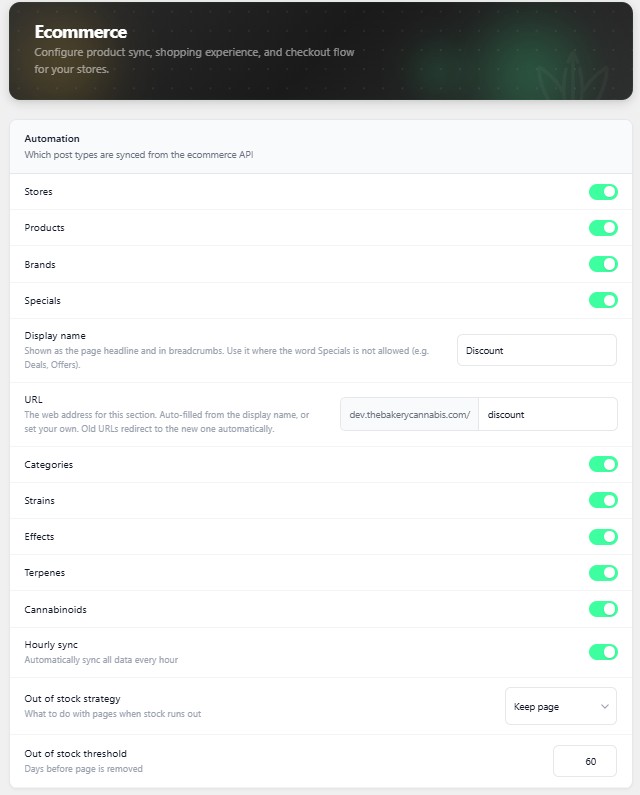
Rank Really High allows dispensaries to configure how their website handles out-of-stock products based on their inventory model and SEO priorities.
These settings can be found in the website backend under:
Rank > Ecommerce > Automation
Out of Stock Strategy
The Out of Stock Strategy setting allows you to choose whether the website should:
- Keep the product page
- Delete the product page
Keeping the page may be appropriate when products frequently return or when preserving rankings, backlinks, and product discovery is important.
Deleting the page may be appropriate for temporary batches, one-time drops, duplicate products, or items that are unlikely to return.
Out of Stock Threshold
The Out of Stock Threshold allows you to choose how many days an out-of-stock product page should remain on the website before the selected strategy is applied.
For example, a dispensary may choose to retain out-of-stock products for:
- 7 days
- 14 days
- 30 days
- A longer custom period
A dispensary with frequently replenished inventory may choose a longer threshold.
A retailer carrying limited drops, rotating batches, and one-time products may choose a shorter threshold.
These settings give each dispensary control over how product pages are handled instead of forcing every website into the same inventory lifecycle.
Keep Product Schema Accurate
When a product goes out of stock, its structured data should reflect its actual availability.
For example:
"availability": "https://schema.org/OutOfStock"
When the product returns, the availability value should update accordingly.
The product page, structured data, ecommerce menu, and POS inventory should all show consistent information.
Inaccurate availability can create a poor customer experience and weaken trust with both shoppers and search engines.
Account for Multi-Location Inventory
For multi-location dispensaries, a product may be out of stock at one store but still available at another.
The page should clearly distinguish between:
- Out of stock at the selected location
- Out of stock at every location
- Available at another nearby store
- Medical-only availability
- Recreational-only availability
- Pickup versus delivery availability
Whenever possible, let customers change locations without leaving the product page.
For example:
Not currently available in Boston. Available for pickup in Cambridge.
A product should not be treated as permanently unavailable across the entire website simply because one store sold out.
A Practical Decision Framework
The product will return soon
Keep the page live, update the availability, and display similar products.
The product may return
Keep the page when it has traffic, rankings, backlinks, or useful content.
Use the out-of-stock threshold to give the product time to return.
The exact batch is gone, but the product continues
Consolidate the page into an evergreen product, strain, or brand page.
The product has been replaced
Redirect the old URL to the closest replacement.
The product is permanently discontinued
Redirect the page to a relevant product, brand, or category when possible.
Return a 404 or 410 when no relevant replacement exists.
The page is duplicate or low quality
Use a canonical tag, noindex directive, redirect, or removal depending on the cause.
The product is unavailable at only one location
Keep the page live and display availability at other stores.
Final Recommendation
Cannabis dispensaries should not treat out-of-stock inventory as a simple on-or-off decision.
The best strategy is usually to:
- Keep temporarily unavailable product pages live
- Recommend relevant products that are currently available
- Preserve pages with rankings and backlinks
- Keep product availability and schema accurate
- Redirect discontinued products to relevant replacements
- Remove pages only when they no longer provide value
- Build evergreen strain, brand, category, and product-type pages
- Configure page retention around actual inventory behavior
Rank Really High gives dispensaries control over this process through configurable Out of Stock Strategy and Out of Stock Threshold settings located under:
Rank > Ecommerce > Automation
The objective is not to keep every product page forever.
The objective is to preserve SEO value, reduce customer dead ends, improve product discovery, and ensure that every indexed page has a clear purpose.